

This guide is in English for now. The tool itself works in your language.
How to make a payment receipt
A receipt is your written proof that you received money. Make one for every payment, so the customer has proof and your dues stay right.
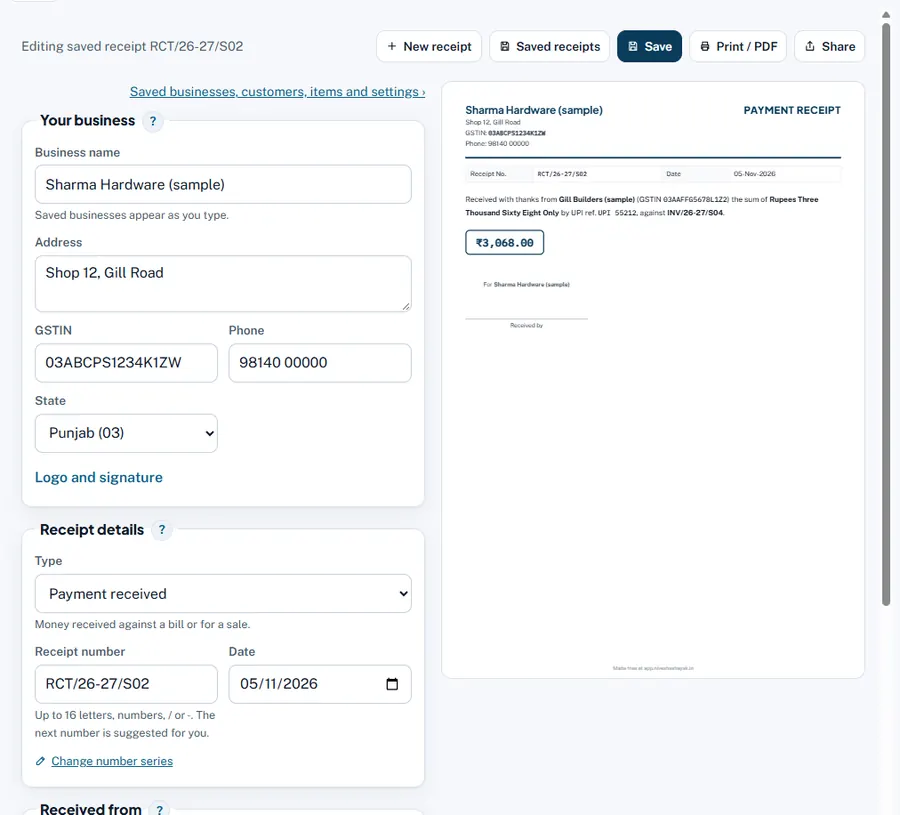
Step by step
- Type: Payment received. Money received against a bill or for a sale.
- Receipt number and date.
- Received from. Name of the payer and GSTIN (if registered).
- Payment. Amount received (₹), Paid by, Cheque or reference number, Cheque or transfer date, Bank (cheque drawn on), Against bill / invoice number, Towards.
- TDS and balance. TDS deducted by the payer (₹) if they cut TDS; Balance still due (₹) prints for the customer.
- Save and share. The amount is written in words on the receipt.
Worked example
Gill Builders pays ₹3,068 by UPI (ref 55212) against INV/26-27/S04. Receipt RCT/26-27/S02: "Received with thanks from Gill Builders the sum of Rupees Three Thousand Sixty Eight Only by UPI ref 55212 against INV/26-27/S04". In the App the invoice shows Paid.
Common mistakes and how to fix them
- Receipts for a cheque before it clears. Write the cheque number; the App counts it in the bank only when cleared.
- Recording the same payment here and again in the App. Both use the same records: the App's Money received already makes the receipt. Open it there with Open.
Try it now: it is free and needs no login.Open the receipt maker
Related help
Advance and refund (receipt voucher)An advance for services carries GST on the day you receive it, and the law asks for a receipt voucher. If the deal is…Money received against billsRecord a customer's payment once and tell the App which bills it pays. The App then knows exactly which bills are still…Print, PDF, WhatsApp and designsA saved receipt can be printed on paper, saved as a PDF, or sent straight to the payer on WhatsApp or e-mail. Pick a…